It's been a ridiculously long time since I last posted here. More than a year. And while it's been an eventful year, I haven't really done that much art-wise. I've done a handful of paintings, I've gotten into doing RedditGetsDrawn portraits, and I've done some doodles, but overall my time has been devoured by /r/ArtFundamentals, which since the time of my last post has evolved into a proper website, drawabox.com. It eats up a lot of my time, but I've been able to monetize it reasonably well, with both ad revenue and a patreon campaign.
Before I get into all of it, I'm gonna warn you - this is a really, REALLY long post and if you want to get to the art, jump all the way to the end.

Showing posts with label Age of Avarice. Show all posts
Showing posts with label Age of Avarice. Show all posts
Tuesday, May 31, 2016

Sunday, September 9, 2012
AoA Map Viewer - 20120908
Been working on this for a bit every evening this past week, and a lot today. Features that have been added include:
- Selecting tiles (can be rendered as a filled chunk or a line drawn between the centres of the tiles)
- Autofilling selections (when your selection isolates unselected tiles, they will automatically become selected if this setting is on)
- Highlighting large regions on mouseover
- Opening maps for individual cells; opening district maps doesn't work entirely just yet
- These maps contain a rough depiction of the coastline, with seas filled in
There's still some glitchiness in some areas, but I'll iron that out soon enough. Tomorrow I guess I'll tackle stuff like getting the district maps working, and pushing the quality of those maps further. Right now they look pretty crappy.
Unfortunately, the more recent version is not playing nice with blogger, so you'll have to check it out here if you're interested: http://ambidextrous-designs.net/ageofavarice/mapviewer2/. This will not work in older browsers like IE8.
If you want to check out the javascript behind it, it's right here: http://ambidextrous-designs.net/ageofavarice/mapviewer2/js/mapviewer.js
Saturday, September 1, 2012
AoA Map Viewer - 20120901
This past week I decided to jump onto AoA again, continuing where I left off - the painful Map viewer. I jumped over a hurtle that had been paining me in my last attempts to move forward with this project, and now that I have a long weekend (labour day!), I'm plenty enthused to move forward.
For now, I just want to see if I can embed the viewer within the blog for show-off purposes. The viewer itself is in some pretty rudimentary stages, but a lot of the foundations are in place. The viewer takes in different 'map' objects that contain information regarding their grids and images - the grids themselves are defined very easily with offsets, dimensions and cell sizes. Based on this, all the functions are already in place to convert between coordinate spaces. This includes:

I hope to have a more impressive display soon! But I'm pretty damn pleased with how this has come out so far. If you want to check out the javascript behind it, it's right here: http://ambidextrous-designs.net/ageofavarice/mapviewer/js/mapviewer.js
For now, I just want to see if I can embed the viewer within the blog for show-off purposes. The viewer itself is in some pretty rudimentary stages, but a lot of the foundations are in place. The viewer takes in different 'map' objects that contain information regarding their grids and images - the grids themselves are defined very easily with offsets, dimensions and cell sizes. Based on this, all the functions are already in place to convert between coordinate spaces. This includes:
- Viewer Space: Where clicks are registered (generally between 0,0 and 800,600 or whatever the viewer's dimensions are)
- Map Space: The original dimensions of the map image (generally between 0,0 and 2000,1500). Any layered decals built on top of the images will be processed in this space, and finally reduced to viewer space at the end. This is so that I can work in a single, consistent space despite all of my zooming and panning.
- Grid Space: The x,y position within the cells. On the main world map, this is between 0,0 and 38,28.
Currently, the only features in place include the ability to zoom and pan around (with a grid that remains attached to the map, but is consistently 1 pixel thick regardless of how much you zoom in) and the ability to double click on a cell to switch to a different map image (currently just a blank piece of parchment).
This is pretty close to as far as I got with the Legend map viewer - however, this application is significantly better in many ways. For example, the grid is no longer redrawn, cell by cell, every time the image is changed. Instead, I cached all of my grids to hidden canvases, and draw the entire grid to the application with a single draw call. I intend to use this method extensively, especially with highlighting cells, and map decals.
So, without further ado, here's the map viewer in its current state. Note that I had to cut it down to 50% of the size to keep it from messing up the blog layout. If you want to see it at the full intended size, check it out here: http://ambidextrous-designs.net/ageofavarice/mapviewer/. Also, this will not work in older browsers (like IE8).
Click and drag to pan around, right click to recenter the map, scroll wheel to zoom. Double click to load into the other blank map page.
Click and drag to pan around, right click to recenter the map, scroll wheel to zoom. Double click to load into the other blank map page.
I hope to have a more impressive display soon! But I'm pretty damn pleased with how this has come out so far. If you want to check out the javascript behind it, it's right here: http://ambidextrous-designs.net/ageofavarice/mapviewer/js/mapviewer.js
Saturday, July 7, 2012
Irshad's Guide to Fantasy Cartography
Over the past several years, I’ve found myself making numerous maps, and have gathered various techniques. Some of these have been learned from other tutorials (for example, jezelf’s method), while others have been discovered through experimentation.
This time around, I’ve documented the process I used in making my most recent map, so I can share it with the rest of you.
This time around, I’ve documented the process I used in making my most recent map, so I can share it with the rest of you.
AoA: Map (Done, for now)

I don't expect this to be the final version - I've ensured that the PSD file is as editable as possible, with virtually everything on its own separate layer. For now, however, I think I'll leave the map alone and move onto something more code-based. Might look into building a new map viewer, which also means tackling the painful grid system, which I still haven't decided on. Squares? Diamonds? Hexagons? I've considered all of them, but I still don't know which to use. Each have their benefits, and each have their disadvantages. Right now I'm actually considering octagons, which... are rather odd. But we'll see.
AoA: Map (Almost Done)
Been a while since my last post - don't really have much to say though. Was doodling in my sketchbook most of the time, and it seems that when I finally let go and doodle whatever I feel like, it ends up being things I don't necessarily want to show to the rest of the world. Or things I probably shouldn't, anyway. Don't worry though - it's nothing all that interesting to the rest of you!
The past week though, I spent most of my time after work on a map for Age of Avarice. It's been a while since I last made a map (roughly fifteen months), and I definitely hit a lot of bumps along the way. I'm not quite done, I still feel like it's missing something, but this is basically where I am with it at the moment. The final version will be about twice as big, as the map viewer I'll be coding (HTML5 baby!) will allow for zooming and panning and whatnot.

The past week though, I spent most of my time after work on a map for Age of Avarice. It's been a while since I last made a map (roughly fifteen months), and I definitely hit a lot of bumps along the way. I'm not quite done, I still feel like it's missing something, but this is basically where I am with it at the moment. The final version will be about twice as big, as the map viewer I'll be coding (HTML5 baby!) will allow for zooming and panning and whatnot.

Sunday, May 27, 2012
ImageMagick, Imagick, and whatever the hell else you want to call it
So I'm a GD boy, when it comes to writing php scripts to build and manipulate images - or at least, I have been for quite some time. I never ventured into ImageMagick, largely because it was significantly less accessible, what with having to be enabled on the server and all that. Besides, until recently I never really needed anything so complex that GD couldn't do the trick.
Yesterday I was experimenting with my avatar bases for AoA. I'm currently painting them in greyscale, then applying a single layer set to the "Color" blend mode in Photoshop. This way, I can make any tweaks I want to the value aspect of the image without having to redo several versions of the base (specifically the various skin tones). Unfortunately, as far as I could tell at that point, I was going to have to save off individual versions of the base for each skin tone, which was not at all something I was looking forward to.
So, as a programmer, I try to facilitate my laziness by writing code, and this time I went on a hunt for a native GD function that would allow me to blend two images together. I found a function that worked similarly to the "Overlay" blend mode (if you're in need of this kind of a function, look into the GD function, imagelayereffect() with the effect IMG_EFFECT_OVERLAY). Unfortunately, this was not exactly what I was looking for, and resulted in some very harsh lighting effects. In the end, I ended up writing a script to scroll through each pixel, convert RGB values to HSL, pull the hue and saturation and dump it into the greyscale image. It worked pretty well, but took a couple seconds. Combined with caching, this was a workable solution, but could not be extended much further, say, if I wanted to work with numerous layers all being processed individually in series.
At this point, I didn't need anything more than that, so I could have settled down with GD and things would have been fine. Fortunately, I don't settle easily, and I wanted to see if there was a better way. In comes ImageMagick. Note: it feels extremely different from GD, and documentation for the PHP functions is piss-poor. This is because ImageMagick is primarily intended to be used through a command-line, and the PHP functions attempt to abstract the commands into something more OOP-friendly.
I ultimately found that I understood better by working with the command-line functions, which can be used directly from PHP using the exec() function. I don't know much just yet, but from what I've gathered, the basic anatomy of a command is as follows:
convert - starts the command
file1.png, file2.png, file3.png - names of existing files in the folder from which the php script is being run
+append - a command that flattens the image down and places the 'layers' side by side horizontally. Conversely, -append could be used to arrange them vertically.
file123.png - the file name of the resulting image, saved relative to the php script's location in the file system.
Fairly easy to understand. It took some doing, but I eventually found a command that allowed me to achieve something *fairly* close to what I wanted, in this form.
For all intensive purposes, this worked. I made a few adjustments, tinkering with levels and brightness of the resulting image (because Photoshop's color blend mode actually tinkers with the value levels a bit), but most importantly I ultimately decided to rewrite this using the PHP Imagick functions, as follows:


Yesterday I was experimenting with my avatar bases for AoA. I'm currently painting them in greyscale, then applying a single layer set to the "Color" blend mode in Photoshop. This way, I can make any tweaks I want to the value aspect of the image without having to redo several versions of the base (specifically the various skin tones). Unfortunately, as far as I could tell at that point, I was going to have to save off individual versions of the base for each skin tone, which was not at all something I was looking forward to.
So, as a programmer, I try to facilitate my laziness by writing code, and this time I went on a hunt for a native GD function that would allow me to blend two images together. I found a function that worked similarly to the "Overlay" blend mode (if you're in need of this kind of a function, look into the GD function, imagelayereffect() with the effect IMG_EFFECT_OVERLAY). Unfortunately, this was not exactly what I was looking for, and resulted in some very harsh lighting effects. In the end, I ended up writing a script to scroll through each pixel, convert RGB values to HSL, pull the hue and saturation and dump it into the greyscale image. It worked pretty well, but took a couple seconds. Combined with caching, this was a workable solution, but could not be extended much further, say, if I wanted to work with numerous layers all being processed individually in series.
At this point, I didn't need anything more than that, so I could have settled down with GD and things would have been fine. Fortunately, I don't settle easily, and I wanted to see if there was a better way. In comes ImageMagick. Note: it feels extremely different from GD, and documentation for the PHP functions is piss-poor. This is because ImageMagick is primarily intended to be used through a command-line, and the PHP functions attempt to abstract the commands into something more OOP-friendly.
I ultimately found that I understood better by working with the command-line functions, which can be used directly from PHP using the exec() function. I don't know much just yet, but from what I've gathered, the basic anatomy of a command is as follows:
convert file1.png file2.png file3.png +append file123.pngThe above command opens three separate files and puts them into your working space. You can imagine this as being three files opened as layers on top of each other if you like, but you can also imagine them to be opened one beside the other. All that matters is the order; file1 comes before file2, which comes before file3. The command then flattens them all down, placing one after the other horizontally, and then saves them as file123.png.
convert - starts the command
file1.png, file2.png, file3.png - names of existing files in the folder from which the php script is being run
+append - a command that flattens the image down and places the 'layers' side by side horizontally. Conversely, -append could be used to arrange them vertically.
file123.png - the file name of the resulting image, saved relative to the php script's location in the file system.
Fairly easy to understand. It took some doing, but I eventually found a command that allowed me to achieve something *fairly* close to what I wanted, in this form.
convert female_base.png female_colour_peach.png -compose colorize -composite result.pngHere, -compose seems to be setting the blending mode to colorize, while -composite seems to flatten the whole image down as though they were layers placed on top of each other. Remember, I'm merely recording my own findings, so I may not be entirely correct in my assumptions. All I know is that this worked fairly well. It carried the hue and saturation of my female_colour_peach.png image and applied them to the corresponding pixels of the female_base.png image, whilst retaining the original brightness/value.
For all intensive purposes, this worked. I made a few adjustments, tinkering with levels and brightness of the resulting image (because Photoshop's color blend mode actually tinkers with the value levels a bit), but most importantly I ultimately decided to rewrite this using the PHP Imagick functions, as follows:
$base = new Imagick("female_base.png");Having written out the code as a command afforded me a greater understanding of how the Imagick PHP functions work. Here, I'm pretty much doing the same thing. I open my files, then I use compositeImage() to paste my $overlay image on top with a blend mode of COLORIZE (the 0,0 are referring to x,y offsets). Then I tinkered with the levels of the image with levelImage() and finally the brightness, saturation and hue with modulateImage().
$overlay = new Imagick("female_colour_peach.png");
$base->compositeImage($overlay,imagick::COMPOSITE_COLORIZE,0,0);
$base->levelImage (0, 1.21, 65535 * .85);
$base->modulateImage(100,125,100);
And the final result is...


Saturday, May 26, 2012
AoA: Female Avatar Base
For the past couple days, I've been working on a female avatar base, whose pose has been based heavily on the male character's. This is primarily because it would make it much easier to take a design made for one gender and apply it to the other with minor modifications.
I was also thinking - maybe I'll scrap the fat option, as I'd shown it on the male avatar in my previous post. It's not because I have anything against the obese! I just feel that a fatter base causes minor changes to the shape of the torso, so clothing that is placed on top of it would not necessarily fit correctly. Furthermore, since I can blend between normal and very muscular, but not from normal and fat, it sticks out awkwardly.
So here's the female, normal and super-fit.
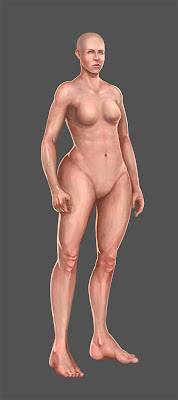

And here she is wearing some of those fancy doodads called 'clothes'.

I was also thinking - maybe I'll scrap the fat option, as I'd shown it on the male avatar in my previous post. It's not because I have anything against the obese! I just feel that a fatter base causes minor changes to the shape of the torso, so clothing that is placed on top of it would not necessarily fit correctly. Furthermore, since I can blend between normal and very muscular, but not from normal and fat, it sticks out awkwardly.
So here's the female, normal and super-fit.


And here she is wearing some of those fancy doodads called 'clothes'.

Thursday, May 24, 2012
AoA: Level of Avatar Fitness
So I'm toying with the idea of giving avatars several points of customization, since as long as I'm not changing the overall silhouette of the figure, I shouldn't run into too much trouble with avatar clothing. Although I can see a few minor problems that can hopefully be ignored or be fixed later.
Here's the three basic levels of fitness. Extremely muscular, average, and chubby. Since none of the features actually move between the first two, I could give players the option to scrub between the two and find whatever level they're happiest with, but unfortunately that cannot be done with the chubby option.


Here's the three basic levels of fitness. Extremely muscular, average, and chubby. Since none of the features actually move between the first two, I could give players the option to scrub between the two and find whatever level they're happiest with, but unfortunately that cannot be done with the chubby option.


Wednesday, May 23, 2012
AoA: Male Avatar... Genetalia?
Today's question is... Should I include the genitals (nothing detailed) or go ken-doll like most RPGs? I briefly asked Ethan that question, and he responded rather childishly - saying that it would be immature to give male characters genitalia. Weird kid. Anyways, I'll leave them on a separate layer and turn them off for now. I can always decide on it later on, and even leave it as a user preference to toggle them on or off.


AoA: Male Avatar Base
Ian thinks that this may be overly detailed, to the point that players would not be able to easily make clothes that would match. He may be right. At the very least, though, I can see the avatars having all sorts of customization options - the face, the level of musculature, etc.
I'll update this post instead of sticking up multiple posts of the various stages of the avatar base.
I'll update this post instead of sticking up multiple posts of the various stages of the avatar base.


Saturday, May 19, 2012
AoA: More Clothing Designs
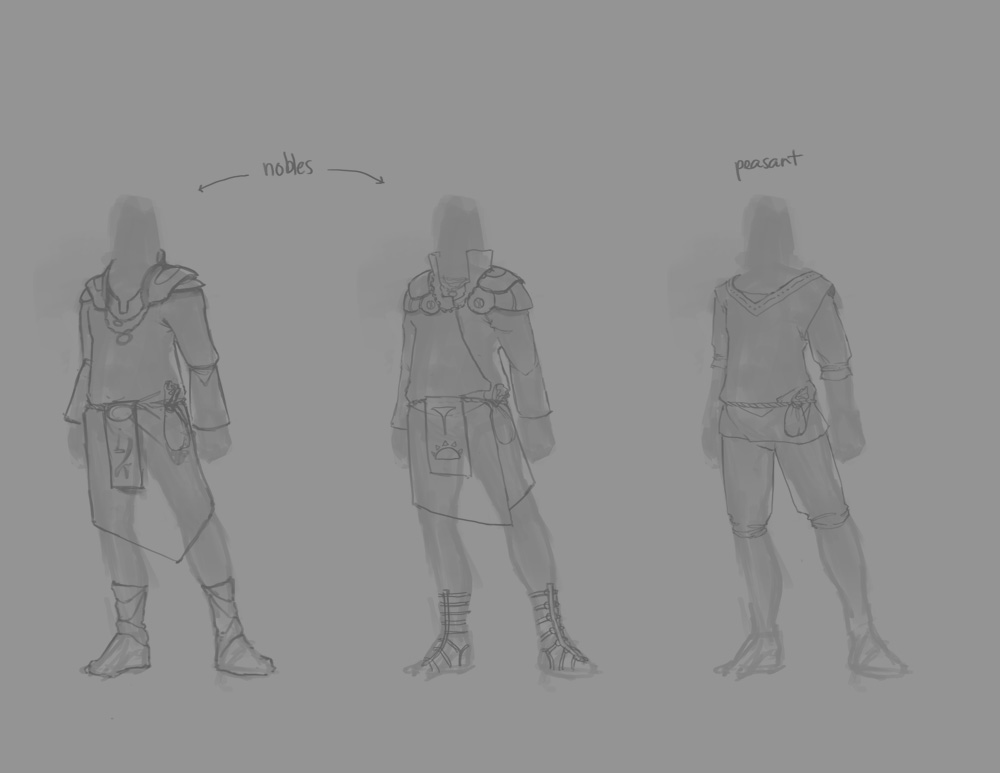
Expanded on the stuff I posted yesterday - added two more peasant designs, a couple soldier designs, a watchman (non-military lawman) design and one more noble design. The three noble outfits gradually escalate in their connection to the military - the rightmost would likely be someone who rose into nobility through service in the army, while the middle would be a noble who served and the left would be a nobleman who chose not to join the army in any capacity.


Friday, May 18, 2012
AoA: Clothing Designs
Ian and I were discussing things, and we came to realize how poorly defined the whole world in which AO, and now more importantly, AoA, took place. We don't even know the general type of clothing people would wear in Avaricia. So, once I finally put down Diablo III for the day (which is awesome mind you), I doodled out some rough clothing designs.

Tuesday, May 15, 2012
AoA: Web Design?
I've... found it very difficult to focus on work today, what with my Diablo III collector's edition having arrived this morning.. But I managed! Sort of. I'm experimenting with the possibility of placing account settings and character settings in boxes above the main navigation - this would double up as boxes for the login and registration forms. Registration should be able to fit in there as well, as I'm planning on making it as quick and simple as possible - not really any longer than the login form. I figure that if people can register quickly, then we'd lose fewer users at that stage.
Behind all of this, there would be a background illustration intended to capture and hold the visitor's attention. Not usually a strategy I've used before, but it seems to be a functioning trend across most game websites. Here's a rough exploration of these strategies, minus the illustration.

Behind all of this, there would be a background illustration intended to capture and hold the visitor's attention. Not usually a strategy I've used before, but it seems to be a functioning trend across most game websites. Here's a rough exploration of these strategies, minus the illustration.

Monday, May 14, 2012


Thursday, May 10, 2012
AoA: Logo work, Avatar base, continued
More work on both avatar base and logo fronts. Khuyen took a big chunk out of her evening to help me by painting over my design and changing it where she saw fit. I haven't yet incorporated anything since then to my own design, but I'll be sure to make use of this new perspective tomorrow.


On the avatar base front, I used this opportunity to experiment with applying colour in ways that would allow me to create several bases with different skin tones without too much extra work. This mostly involved using colour and overlay layers in photoshop. I also quickly scribbled on some simple clothing and hair to test out how it would look when dressed.


AoA: Logo work, Avatar base
I showed the logo design to a few particularly significant people (Ian, Luke, Khuyen). Got a positive review from the first two, but Khuyen felt I was capable of better. Unfortunately, thanks to some unsavoury internet problems on her end, I couldn't get anything more constructive than that. I'll admit that I felt very much ill-at-ease with the use of the heavy block text, but I still liked the overall design. It's difficult for me to trash something I genuinely like without being thoroughly convinced first. But she does have much more design training under her belt... Hm.
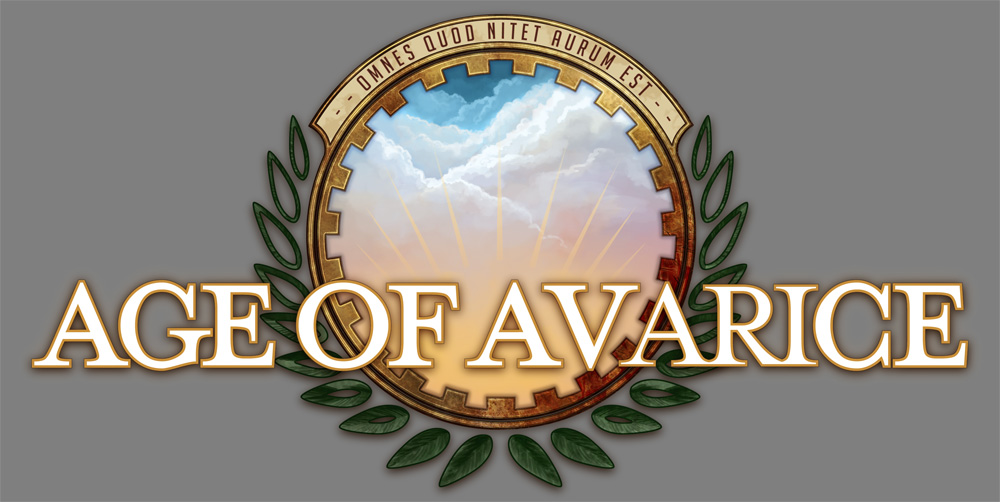
Having already chugged through the colour-experiments on the logo by this point, I decided to plow on ahead. I also happened to become even more dissatisfied with the text at this point, because it became even more dominant compared to the coloured elements. Below is my most recent rendition of the logo. Only the leaves are lacking any hand-painted texture (because I'm heading to bed).

Almost simultaneously while working on this, I was switching over to a rough attempt at painting a female avatar base. I'll probably make a lot of these 'attempts' as I figure out the appropriate anatomy and posing. God, the posing. As Jane rather tactlessly (albeit accurately) declared some time ago, my figures tend to be pretty horrible. This, compounded with the incredibly difficult task of finding a pose that is both neutral, but can be used to show a character properly wielding weapons, will undoubtedly result in a slew of test-runs. I think I should warm up with some figure drawing tomorrow before I start on another...

Having already chugged through the colour-experiments on the logo by this point, I decided to plow on ahead. I also happened to become even more dissatisfied with the text at this point, because it became even more dominant compared to the coloured elements. Below is my most recent rendition of the logo. Only the leaves are lacking any hand-painted texture (because I'm heading to bed).

Almost simultaneously while working on this, I was switching over to a rough attempt at painting a female avatar base. I'll probably make a lot of these 'attempts' as I figure out the appropriate anatomy and posing. God, the posing. As Jane rather tactlessly (albeit accurately) declared some time ago, my figures tend to be pretty horrible. This, compounded with the incredibly difficult task of finding a pose that is both neutral, but can be used to show a character properly wielding weapons, will undoubtedly result in a slew of test-runs. I think I should warm up with some figure drawing tomorrow before I start on another...

Tuesday, May 8, 2012
Age of Avarice Logo
While I was fumbling around, trying to come up with vague logo ideas, Luke (largely unaware of what I was doing) mentioned something about a crest. Based on that offhand comment, I started in a completely different direction from the one I was initially taking. I didn't really know what I was doing or what I was going for - just trying to combine various elements (snakes, suns, stars, laurels, etc.) into something that would fit the game. Here are a few things that resulted from brainstorming, along with a somewhat more finished one-colour logo.


 The first two were me following a direction that ended up being a dead end. I wanted to incorporate snakes to represent the constant atmosphere of treachery, deceit and mistrust, but the curves looked far too... well, wrong. It really makes me appreciate Jane's dragon snowboard design that much more. I'd link to it, but I don't think she's posted it anywhere.
The latin phrase (courtesy of Luke again), "Omnes Quod Nitet Aurum Est" supposedly means "All that Glitters is Gold".


The latin phrase (courtesy of Luke again), "Omnes Quod Nitet Aurum Est" supposedly means "All that Glitters is Gold".
The Age of Avarice
So I've mentioned Anathema Online and Legend in the past, but I'll step back and re-explain what they were, in the spirit of starting afresh.
Anathema Online was my attempt at taking freeform roleplay to the next level - basically an MMORPG for writers, with the structure of a proper game, and the freedom of roleplaying. Players could create characters (represented with avatars) and move around the game world (between rooms, buildings, towns). They could open businesses like restaurants or shops, sell custom clothing for avatars, and also craft weapons and armour. Of course there was a combat system as well, but eventually siege warfare entered the game as whole towns and kingdoms started going to war against one another. It ran between November 2006 and October 2008, just short of a full two years. Our largest user base at any given time was at best a measly 30 players, but people seemed to enjoy it well enough.
Of course, it cannot be ignored that AO quickly fell victim to feature creep, as we expanded the game in order to cater to growing needs and concerns. When I finally decided to close the game, it was not only because the player count waned, but also because I felt that development was becoming far too messy. The HTML/CSS was nowhere near standards compliant, the code was inefficient and the database was poorly structured. It was all a learning experience, after all - my first major PHP/MySQL based project, and for having developed it while in high school, I'm still rather impressed with myself.
Legend was intended to be its successor. While it followed a similar structure, the design was significantly more geared towards a structure game, on occasion sacrificing player freedom in certain areas. This was intended to be my attempt at building a cleaner, more functional version of AO - however, development was shaky, and I often had to put it down for months at a time in order to focus on school work. My goals were far too lofty, and the world I was attempting to create was too vast. Recently, I decided to abandon this project. Once school ended and I got a chance to sit down and look at the code, I realized that there was just too much. Continuing would only result in more complication.
So now, I've stepped back. I'm not bothered by having to abandon Legend - rather I see it as a learning experience, that will fuel my last attempt at a game of this nature. It's a fact - developing a text-based game does not easily contribute in a positive manner to one's portfolio. It may have when I was in high school, but these days employers just give you funny looks. But that said, I genuinely enjoyed playing AO, and I'd like to be able to do it again. This is no longer a matter of building something to impress people, but rather to build something that will make me happy.
Age of Avarice, as it will likely be named, will for the most part be Legend simplified. Rather than building a new world with fresh lore, we will go back to explore the events following a major war in Anathema Online. The city of Avaricia will be fresh out of a war that left it in a state of disarray. With faith in the King shaken, the military has risen up against the monarchy, and besieged the palace. In order to focus their efforts on capturing the throne, the lower town has been abandoned to all but anarchy, with gangs rising to overshadow the paltry local watch. The whole city is up for grabs, and any player is free to make an attempt at claiming it.
On top of the game, we are looking to include a bit of metagame that allows players to contribute to the depth and breadth of the world itself. Just as they could in AO, they will be able to create clothing, although this time around it will be clothing designs that will be sold in-world through official guilds or some other such entity. This way characters will be able to purchase designs, and given that they have the appropriate skill level and ingredients (set by staff when approving the design), they will be able to create the item and stock it in a shop. A similar system will be used for anything between cooking recipes, stories and songs for bards, and even spell concepts. By contributing to the world itself, players will earn points/gold/what-have-you at the account level (out of character), which they will then be able to spend in a metagame shop. Here they will be able to purchase particularly special items, such as one-off potions to temporarily increase certain stats, treasure maps and magical artifacts.
Thanks to a potential large-scale project contract I may or may not be working on, I was taking a look at CodeIgniter (light-weight PHP framework) yesterday. I've never worked with PHP frameworks before, and looking over the documentation shows how different the workflow would be (it relies on a strict MVC architecture). Still, CodeIgniter looks very promising, and I'm interested in using it with Age of Avarice. But first, I need to settle on a website design!
Anathema Online was my attempt at taking freeform roleplay to the next level - basically an MMORPG for writers, with the structure of a proper game, and the freedom of roleplaying. Players could create characters (represented with avatars) and move around the game world (between rooms, buildings, towns). They could open businesses like restaurants or shops, sell custom clothing for avatars, and also craft weapons and armour. Of course there was a combat system as well, but eventually siege warfare entered the game as whole towns and kingdoms started going to war against one another. It ran between November 2006 and October 2008, just short of a full two years. Our largest user base at any given time was at best a measly 30 players, but people seemed to enjoy it well enough.
Of course, it cannot be ignored that AO quickly fell victim to feature creep, as we expanded the game in order to cater to growing needs and concerns. When I finally decided to close the game, it was not only because the player count waned, but also because I felt that development was becoming far too messy. The HTML/CSS was nowhere near standards compliant, the code was inefficient and the database was poorly structured. It was all a learning experience, after all - my first major PHP/MySQL based project, and for having developed it while in high school, I'm still rather impressed with myself.
Legend was intended to be its successor. While it followed a similar structure, the design was significantly more geared towards a structure game, on occasion sacrificing player freedom in certain areas. This was intended to be my attempt at building a cleaner, more functional version of AO - however, development was shaky, and I often had to put it down for months at a time in order to focus on school work. My goals were far too lofty, and the world I was attempting to create was too vast. Recently, I decided to abandon this project. Once school ended and I got a chance to sit down and look at the code, I realized that there was just too much. Continuing would only result in more complication.
So now, I've stepped back. I'm not bothered by having to abandon Legend - rather I see it as a learning experience, that will fuel my last attempt at a game of this nature. It's a fact - developing a text-based game does not easily contribute in a positive manner to one's portfolio. It may have when I was in high school, but these days employers just give you funny looks. But that said, I genuinely enjoyed playing AO, and I'd like to be able to do it again. This is no longer a matter of building something to impress people, but rather to build something that will make me happy.
Age of Avarice, as it will likely be named, will for the most part be Legend simplified. Rather than building a new world with fresh lore, we will go back to explore the events following a major war in Anathema Online. The city of Avaricia will be fresh out of a war that left it in a state of disarray. With faith in the King shaken, the military has risen up against the monarchy, and besieged the palace. In order to focus their efforts on capturing the throne, the lower town has been abandoned to all but anarchy, with gangs rising to overshadow the paltry local watch. The whole city is up for grabs, and any player is free to make an attempt at claiming it.
On top of the game, we are looking to include a bit of metagame that allows players to contribute to the depth and breadth of the world itself. Just as they could in AO, they will be able to create clothing, although this time around it will be clothing designs that will be sold in-world through official guilds or some other such entity. This way characters will be able to purchase designs, and given that they have the appropriate skill level and ingredients (set by staff when approving the design), they will be able to create the item and stock it in a shop. A similar system will be used for anything between cooking recipes, stories and songs for bards, and even spell concepts. By contributing to the world itself, players will earn points/gold/what-have-you at the account level (out of character), which they will then be able to spend in a metagame shop. Here they will be able to purchase particularly special items, such as one-off potions to temporarily increase certain stats, treasure maps and magical artifacts.
Thanks to a potential large-scale project contract I may or may not be working on, I was taking a look at CodeIgniter (light-weight PHP framework) yesterday. I've never worked with PHP frameworks before, and looking over the documentation shows how different the workflow would be (it relies on a strict MVC architecture). Still, CodeIgniter looks very promising, and I'm interested in using it with Age of Avarice. But first, I need to settle on a website design!
Subscribe to:
Posts (Atom)